

Close Menu
bkngpnarnaul
  • Home
  • Education
    • Biology
    • Chemistry
    • Math
    • Physics
    • Science
    • Teacher
  • E-Learning
    • Educational Technology
  • Health Education
    • Special Education
  • Higher Education
  • IELTS
  • Language Learning
  • Study Abroad

Subscribe to Updates

Please enable JavaScript in your browser to complete this form.
Loading
What's Hot

How This District Teaches Bilingual Students With Dyslexia

December 15, 2025

Climb to Success: The Mountain Challenge

December 15, 2025

Meet Four People Who Did an Internship in London, England 

December 15, 2025
Facebook X (Twitter) Instagram
Monday, December 15
Facebook X (Twitter) Instagram Pinterest Vimeo
bkngpnarnaul
  • Home
  • Education
    • Biology
    • Chemistry
    • Math
    • Physics
    • Science
    • Teacher
  • E-Learning
    • Educational Technology
  • Health Education
    • Special Education
  • Higher Education
  • IELTS
  • Language Learning
  • Study Abroad
bkngpnarnaul
Home»Special Education»How to Set Up IEP Goal Bins for Easy Progress Monitoring
Special Education

How to Set Up IEP Goal Bins for Easy Progress Monitoring

adminBy adminAugust 31, 20251 Comment3 Mins Read3 Views
Share Facebook Twitter Pinterest LinkedIn Tumblr Email WhatsApp Copy Link
Follow Us
Google News Flipboard Threads
How to Set Up IEP Goal Bins for Easy Progress Monitoring
Share
Facebook Twitter LinkedIn Pinterest Email Copy Link


How to set up IEP Goal Bins for special education self-contained classrooms!

Progress monitoring can feel like one of the most time-consuming parts of teaching in a self-contained classroom. Between collecting consistent data, finding materials, and making sure each student’s IEP goals are addressed, it’s easy to feel buried.

That’s why I love using IEP Goal Bins. They turn a stressful process into a simple, organized system that actually works in the classroom. Here’s how you can set them up.

How to set up IEP Goal Bins for special education self-contained classrooms!How to set up IEP Goal Bins for special education self-contained classrooms!

Step 1: Gather Your Materials

Before setting up bins, collect the essentials:

  • A plastic bin or container for each student
  • File folders or pouches for separating goals
  • Task cards, worksheets, or manipulatives aligned with IEP goals
  • A data collection sheet for each goal

Keep everything in one place so staff can grab and go without searching.
How to set up IEP Goal Bins for special education self-contained classrooms!How to set up IEP Goal Bins for special education self-contained classrooms!

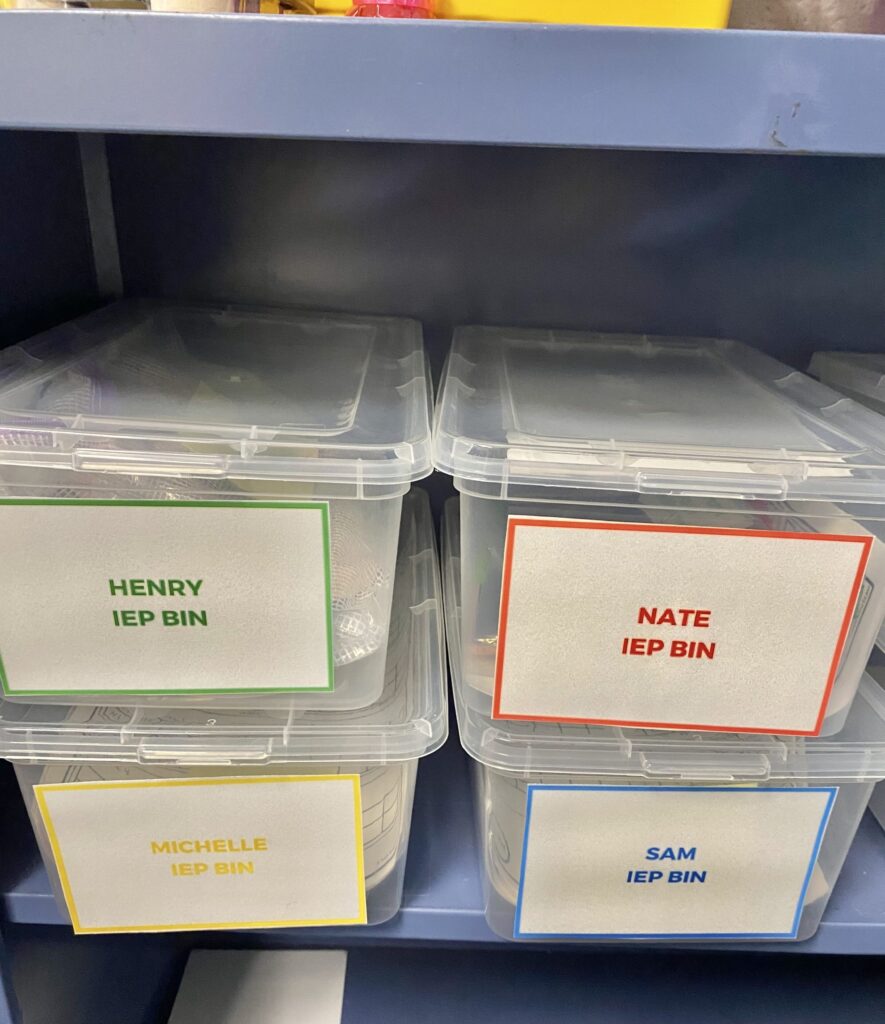
Step 2: Assign a Bin to Each Student

Each student should have their own bin clearly labeled with their name. This makes it easy for staff to know exactly where to go when it’s time to work on goals.

Inside, divide the bin into sections (or folders) by goal area: academics, communication, behavior, fine motor, etc.
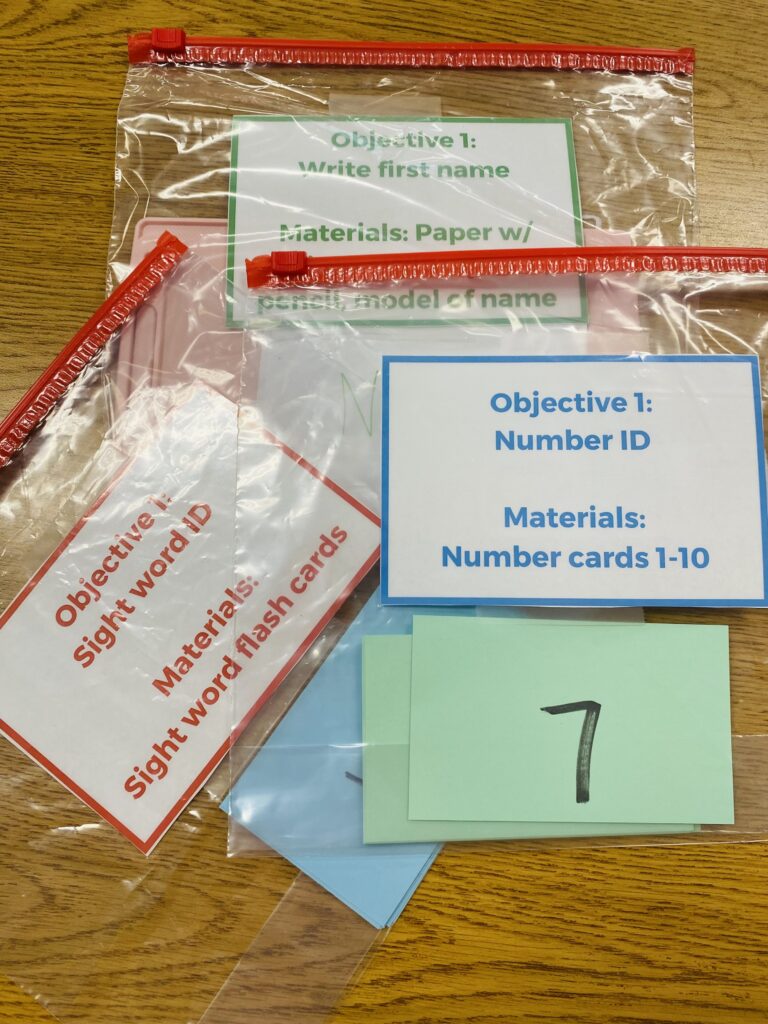
How to set up IEP Goal Bins for special education self-contained classrooms!How to set up IEP Goal Bins for special education self-contained classrooms!

Step 3: Match Materials to IEP Goals

For each IEP goal, choose 2–3 activities that can be repeated and adapted. For example:

  • Math Goal: Counting bears, laminated number cards, or a simple worksheet
  • Reading Goal: Sight word flashcards, a matching game, or adapted books
  • Fine Motor Goal: Lacing cards, clothespin tasks, or cutting strips

This way, you’ll always have something ready without scrambling for new activities every week.

How to set up IEP Goal Bins for special education self-contained classrooms!How to set up IEP Goal Bins for special education self-contained classrooms!

Step 4: Add Data Collection Sheets

Keep a progress monitoring sheet directly behind the activity. Staff can run the activity and immediately mark data. This eliminates the “I’ll write it later” problem and ensures consistent collection.

Tip: Use simple checklists, tallies, or quick notes—whatever system your team can realistically keep up with.

How to set up IEP Goal Bins for special education self-contained classrooms!How to set up IEP Goal Bins for special education self-contained classrooms!

Step 5: Train Your Team

Your bins won’t work unless everyone knows how to use them. Model the process:

  1. Grab the bin.
  2. Pick the goal folder.
  3. Run the activity.
  4. Record the data.

Once your staff understands the flow, progress monitoring becomes routine instead of a chore.

How to set up IEP Goal Bins for special education self-contained classrooms!How to set up IEP Goal Bins for special education self-contained classrooms!

Why This System Works

  • Everything is in one place—no wasted time searching for materials.
  • Activities are goal-aligned and repeatable, which makes consistency possible.
  • Data is collected right away, which keeps you ready for IEP meetings at any time.
How to set up IEP Goal Bins for special education self-contained classrooms!How to set up IEP Goal Bins for special education self-contained classrooms!

Want to See It in Action?

If you’re a visual learner (like me!), sometimes it helps to actually watch the process step by step. I’ve put together a free training where I’ll walk you through setting up IEP Goal Bins and even give you free starter materials.

👉 Sign up for the free webinar here.


Source link

Bins Easy Goal IEP Monitoring Progress set
Share. Facebook Twitter Pinterest LinkedIn Tumblr Email WhatsApp Copy Link
thanhphuchoang09
admin
  • Website

Related Posts

Special Education

How This District Teaches Bilingual Students With Dyslexia

December 15, 2025
Special Education

Save 25% on Books, Downloads, and Advocacy Supplies! Gift Certificates Available!

December 14, 2025
Special Education

Are Adapted Books Good or Bad?

December 12, 2025
Teacher

Reuse Post for Easy Assignments

December 12, 2025
Special Education

Collecting Data When You Have No Time

December 11, 2025
Special Education

Teachers Are Using AI to Help Write IEPs. Advocates Have Concerns

December 10, 2025
View 1 Comment

1 Comment

  1. 🔑 Security Notice: 0.4 Bitcoin transfer requested. Authorize? > https://graph.org/TAKE-YOUR-BITCOIN-07-23?hs=708eacfdffcbb0f0e65616388b1cf919& 🔑
    🔑 Security Notice: 0.4 Bitcoin transfer requested. Authorize? > https://graph.org/TAKE-YOUR-BITCOIN-07-23?hs=708eacfdffcbb0f0e65616388b1cf919& 🔑 on September 1, 2025 5:37 am

    0lt98y

    Log in to Reply
Leave A Reply Cancel Reply

You must be logged in to post a comment.

Top Posts

Announcing the All-New EdTechTeacher Summer Learning Pass!

May 31, 202551 Views

Improve your speech with immersive lessons!

May 28, 202546 Views

Hannah’s Spring Semester in Cannes

May 28, 202539 Views

Weekly Student News Quiz: National Guard, Taylor Swift, Comets

October 13, 202535 Views
Don't Miss

Meet Four People Who Did an Internship in London, England 

By adminDecember 15, 20250

49 As the former seat of the British Empire, England has a fascinating history and…

How Do I Find A Study Abroad Program that Matches My Major?

December 11, 2025

Winter Holidays Around the World: Seasonal Celebrations Abroad

December 7, 2025

Introducing AIFS Abroad’s Spring 2026 Green Ambassadors

December 3, 2025
Stay In Touch
  • Facebook
  • Twitter
  • Pinterest
  • Instagram
  • YouTube
  • Vimeo

Subscribe to Updates

Please enable JavaScript in your browser to complete this form.
Loading
About Us
About Us

Welcome to Bkngpnarnaul. At Bkngpnarnaul, we are committed to shaping the future of technical education in Haryana. As a premier government institution, our mission is to empower students with the knowledge, skills, and practical experience needed to thrive in today’s competitive and ever-evolving technological landscape.

Our Picks

How This District Teaches Bilingual Students With Dyslexia

December 15, 2025

Climb to Success: The Mountain Challenge

December 15, 2025

Subscribe to Updates

Please enable JavaScript in your browser to complete this form.
Loading
Copyright© 2025 Bkngpnarnaul All Rights Reserved.
  • About Us
  • Contact Us
  • Disclaimer
  • Privacy Policy
  • Terms and Conditions

Type above and press Enter to search. Press Esc to cancel.